
How UPI Withdrawals Work on Online Earning Platforms
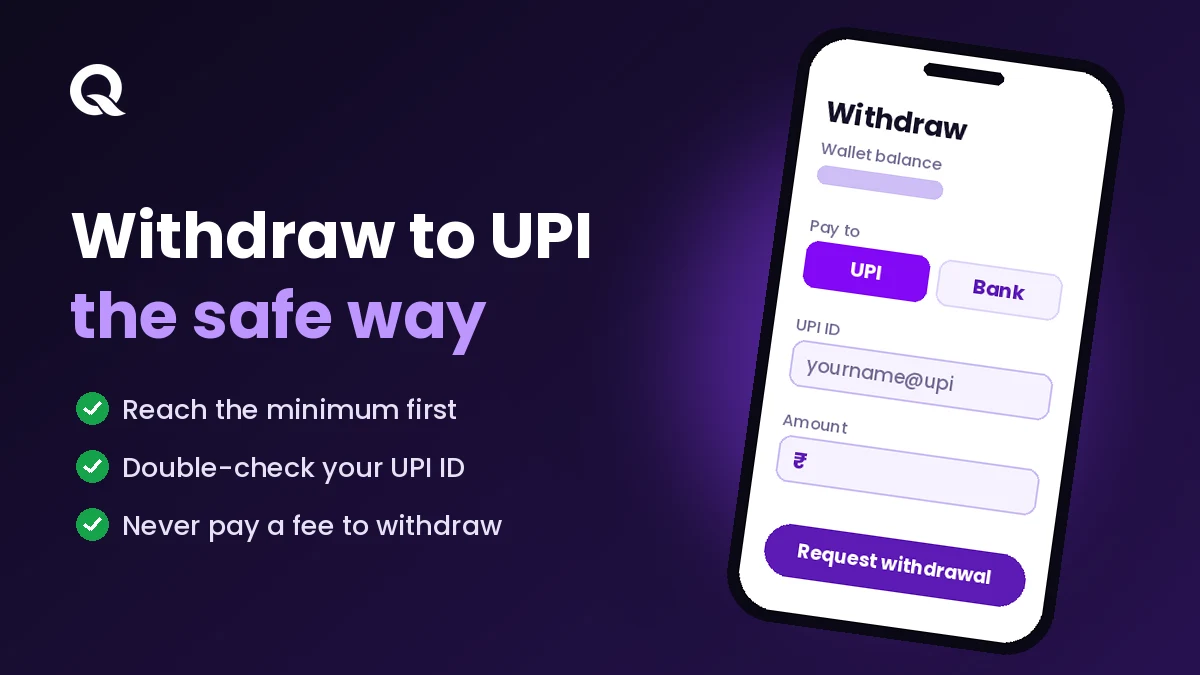
You finished a few quizzes and surveys, your wallet balance has grown, and now you want the money in your bank account. On most Indian earning platforms, the easiest way is a UPI withdrawal. This guide explains how UPI withdrawals work, why there is a minimum and a review step, and the one safety rule that protects you from most withdrawal scams.
It is written for beginners. We use QykJob as one example, because its withdrawal rules are public and we can point to them.
What Is a UPI Withdrawal?
A UPI withdrawal is when an earning platform sends money from your in-app balance to your bank account using UPI (Unified Payments Interface). UPI is the same system you use to pay at shops by scanning a QR code or to send money to friends.
For a withdrawal, the platform is the one paying, and you are the one receiving. That small detail matters a lot for your safety, as you will see below.
What Is a UPI ID?
A UPI ID is your payment address. It usually looks like yourname@bankname or yourmobilenumber@app, and it is linked to one of your bank accounts. You can find it in your UPI app's profile section.
To receive money, you only need to share your UPI ID. You never need to share your UPI PIN, OTP, card details or bank password.
How a UPI Withdrawal Usually Works
The steps are similar on most genuine platforms:
- Reach the minimum. Most platforms set a minimum amount before you can withdraw.
- Open the Withdraw page. Choose UPI as the payout method.
- Enter your UPI ID and amount. Check every character of the UPI ID.
- Submit the request. The amount usually moves out of your available balance while the request is checked.
- Wait for the review. The platform checks the request for fraud and correct details.
- Receive the money. Once paid, the amount reaches your bank account linked to that UPI ID, and the request shows as paid in your history.
UPI Withdrawals on QykJob
QykJob is an online earning platform with tasks, quizzes and surveys, and every reward goes to your QykJob wallet in rupees. Withdrawals are open: whenever your balance reaches the minimum shown in your wallet, you can request one to UPI or bank transfer, and each request is reviewed before payment.
On the Withdraw page, you choose how you want to be paid and enter your UPI ID. The page explains that QykJob checks the format of the UPI ID, and that the account name is shown to the team in the UPI app before paying, so the ID must be your own. Your requests and their status (pending, paid or rejected) are listed on the same page.
QykJob's Terms add a few important points:
- The minimum amount and rules for each method are shown on the Withdraw page and in your wallet.
- Requests are reviewed before payment. QykJob aims to pay within 7 business days, but timing is not guaranteed.
- If a request is rejected, for example because of wrong details or suspected fraud, the amount is returned to your wallet.
- You should check your payment details carefully, because money sent to wrong details you entered cannot be the platform's responsibility.
- QykJob may ask you to verify your identity before paying.
- QykJob never asks you to pay or deposit money to withdraw, and never asks for your password, OTP or UPI PIN.
Why Is There a Minimum and a Review?
A minimum withdrawal keeps payouts practical. Sending many very small payments one by one takes time and effort, so platforms usually wait until the balance is worth sending.
The review step protects honest users. It lets the platform catch fake accounts, duplicate accounts and bot activity before money goes out. Without it, rewards for genuine users would not be sustainable. A short wait for review is normal. A demand for money to "speed it up" is not.
The Golden Rule: No UPI PIN to Receive Money
Remember this one rule and you will avoid most withdrawal scams. The National Payments Corporation of India (NPCI), which runs UPI, says you should enter your UPI PIN only to deduct money from your account, and that a UPI PIN is not required for receiving money.
So if anyone tells you to enter your PIN, scan a QR code or approve a "request" to receive your earnings, stop. That action would send money out of your account, not into it.
Common Withdrawal Scams to Watch For
- "Pay a fee to unlock your withdrawal." A fake app shows a big balance, then asks for a tax, fee or deposit before you can withdraw. Genuine platforms do not do this.
- Collect requests. Someone sends a payment request to your UPI app and says approving it will credit your earnings. Approving it with your PIN pays them.
- QR codes to "receive" money. Scanning a QR code and entering your PIN is for paying, never for receiving.
- Fake support agents. A caller or WhatsApp account claims to be from the platform and asks for your OTP, PIN or a screen-sharing app.
- Withdrawals that never arrive. If an app keeps raising the minimum or always finds a new reason not to pay, stop adding time to it.
Our guide on how to check whether an earning app is genuine has more warning signs.
A Quick Checklist Before You Withdraw
- Your balance has reached the minimum shown in your wallet.
- The UPI ID is yours and typed correctly. Copy it from your UPI app if you can.
- The bank account linked to that UPI ID is active.
- Nobody has asked you to pay anything to withdraw.
- You have not shared your OTP, UPI PIN or password with anyone.
What If Your Withdrawal Is Delayed or Rejected?
First, open your withdrawal history and check the status and any note from the team. If it was rejected for wrong details, correct your UPI ID and request again, since a rejected amount goes back to your wallet on QykJob. If a request is still pending after the stated time, contact the platform only through its official Support page, not through numbers or links sent by strangers.
Income from any source may be taxable in India, and QykJob's Terms say users are responsible for any tax on their earnings. If you lose money to an online fraud, report it at cybercrime.gov.in or call 1930 as soon as possible.
Frequently Asked Questions
Do I need my UPI PIN to receive a withdrawal?
No. According to NPCI, the UPI PIN is only for sending money. You never need it to receive money.
How long does a UPI withdrawal take?
It depends on the platform's review. QykJob aims to pay within 7 business days, but timing is not guaranteed.
What happens if I enter the wrong UPI ID?
The request may be rejected and returned to your wallet, or the money may go to the wrong person. Always double-check your UPI ID before you submit.
Why is there a minimum withdrawal?
It keeps payouts practical and gives the platform time to check for fraud. The exact minimum is shown in your wallet.
Should I pay a fee to withdraw my earnings?
No. Genuine platforms do not ask you to pay or deposit money to withdraw. If an app does, it is a warning sign.
Sources
Related articles
How Refer-and-Earn Programs Work (and How to Use Them Right)
How refer-and-earn programs work, when referral rewards really count, how to share your link without spamming, and how to tell a referral program from a pyramid scheme.
Read article →
Can You Really Earn Money Playing Quizzes? An Honest Look
How quiz earning really works, what you can expect, why paid quiz contests are banned in India, and how to spot fake quiz apps.
Read article →
Paid Online Surveys: How They Work and What to Expect
How paid online surveys work, why you get screened out, what you can realistically expect and how to spot fake survey offers.
Read article →